 editer@kidkosh.in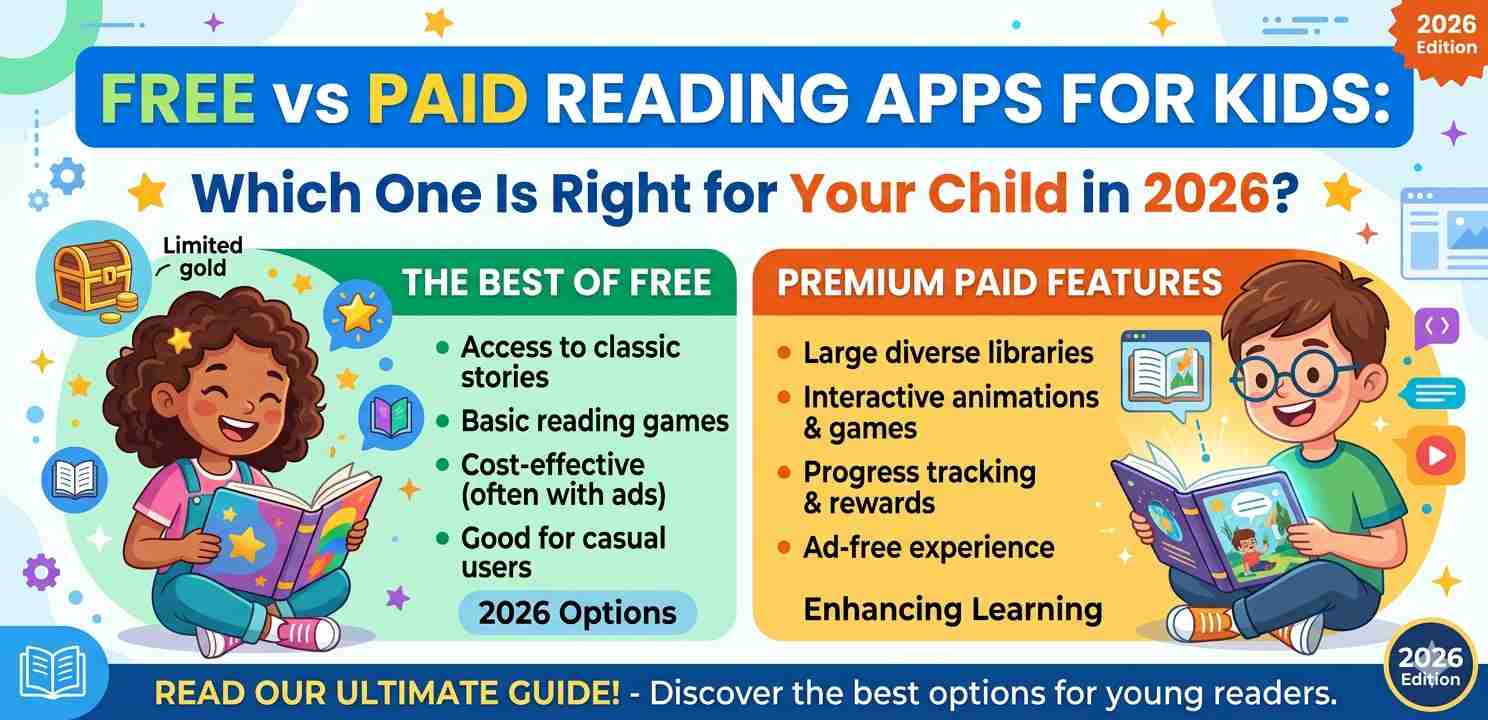
If you’ve been searching for the right reading apps for kids, you already know how overwhelming the options can feel. There are dozens of apps out there — some free, some charging a monthly fee — and every single one claims to be the best tool for building your child’s reading skills. So which one actually delivers?
This guide breaks it all down simply. No jargon, no marketing language — just practical advice based on how these apps actually work on real devices like Android phones and tablets.
Why Parents Are Turning to Reading Apps for Kids in 2026
Screen time used to be a concern. Now it’s a reality. And smart parents are figuring out how to make that screen time actually count.
Reading apps for kids have come a long way since the early days of basic phonics games. Today, many of them offer structured learning paths, real books, interactive stories, and even progress tracking. Some of the better ones feel less like apps and more like a digital reading tutor.
The big question isn’t really “app or no app” anymore. It’s: should you pay for one, or stick with the free options?
What Free Reading Apps for Kids Actually Offer
Free apps are more capable than most people expect — especially in 2026. Several well-known reading apps for kids offer genuinely useful features at no cost.
What You’ll Typically Get for Free
Most free apps include a starter set of books or lessons. You’ll often find basic phonics activities, some short stories, and maybe a few read-aloud features. Apps like Starfall, Epic (with a free trial), and Google Play Books offer solid entry points without spending anything.
On an Android phone or tablet, these free reading apps for kids install quickly and don’t require creating an account just to get started. That’s actually helpful when you just want your child to try something out before committing.
The Honest Limitations of Free Apps
Here’s where free apps tend to fall short. Content libraries are usually limited. Your child might go through everything available within a week or two, and then the app loses its appeal.
Many free reading apps for kids also rely on ads to stay running. Depending on the app, those ads can interrupt storytime or direct kids toward unrelated content. That’s a real concern for parents of younger children.
Progress tracking — the feature that lets you see what your child has read and how they’re improving — is often locked behind a paywall in otherwise free apps.
What Paid Reading Apps for Kids Offer
Paid apps, usually running between $5 and $15 per month, generally offer a much fuller experience. The difference isn’t just quantity — it’s depth.
Larger, Constantly Updated Libraries
Apps like Epic, Raz-Kids, and Reading Eggs (in their paid tiers) give children access to hundreds or even thousands of titles. These reading apps for kids update their libraries regularly, so a child who reads every day won’t run out of material for months.
For older kids, this matters a lot. If your 8-year-old goes through 3 or 4 books a week, a free app simply can’t keep up.
Structured Learning Paths
This is probably the biggest advantage of paid reading apps for kids. Instead of just handing your child a pile of random books, good paid apps guide them through a learning path based on their age, reading level, and progress.
Think of it like a curriculum built into the app. Each lesson or book connects to the next one in a way that builds skills gradually. Free apps rarely offer this kind of structure.
No Ads, Better Focus
Paid reading apps for kids almost always remove ads entirely. For a young child sitting with a tablet, that makes a real difference. There are no distractions, no accidental taps on something unrelated, and no sudden interruptions mid-story.
Parents who’ve tried both versions often say this alone is worth the cost.
Comparing Free vs Paid Reading Apps for Kids Side by Side
Let’s look at the key differences more directly:
Content Library: Free apps offer limited titles, usually 20–100. Paid apps provide hundreds to thousands.
Ad-Free Experience: Most free apps show ads. Paid apps are almost always ad-free.
Learning Structure: Free apps are largely unguided. Paid apps offer age-based, structured reading paths.
Progress Tracking: Rarely available for free. Standard feature in most paid reading apps for kids.
Offline Access: Occasionally available in free versions, but more consistently offered in paid tiers.
Device Compatibility: Both types generally support Android and iOS well in 2026.
Which Type of Reading App Is Best for Your Child’s Age?
Age matters more than most parents realize when picking reading apps for kids. What works for a 4-year-old is very different from what a 10-year-old needs.
Ages 3–5: Free Apps Work Well Here
At this age, children are just getting familiar with letters and sounds. A free app with basic phonics activities, colorful illustrations, and read-aloud features is often more than enough.
Apps like Starfall are genuinely excellent for early learners and cost nothing. For this age group, you don’t necessarily need the full library a paid app provides — a focused phonics experience is more valuable.
Ages 6–9: Consider Going Paid
This is the stage where reading skills either click or get stuck. Children this age benefit from consistent, structured practice with a variety of texts. Free reading apps for kids often can’t deliver enough variety to keep up with a child who’s progressing quickly.
A paid app with a proper reading curriculum, like Reading Eggs or Raz-Kids, can make a noticeable difference here. If your child’s school uses one of these platforms, it may already be available to them for free through their teacher — worth checking before you pay.
Ages 10–12: Quality Over Quantity
Older kids need books that actually interest them, not just easy readers. At this stage, the best reading apps for kids are ones that feel more like a digital library than a game.
Epic’s paid tier, for example, includes novels, graphic novels, and nonfiction that older kids actually want to read. The gamified elements become less important, and the depth of the library matters more.
Android-Specific Tips for Reading Apps
Most of this guide applies to any device, but if your child uses an Android phone or tablet, there are a few extra things worth knowing.
Android’s Google Family Link feature lets you manage which reading apps for kids your child can download and how long they can use them. This pairs really well with any reading app — free or paid — because you can set screen time limits without being the “bad guy.”
If you’re using a budget Android tablet for your child, stick to apps that offer offline downloads. Cheaper tablets often have slower internet connections, and offline access keeps storytime smooth. Most paid reading apps for kids offer this feature; it’s less consistent in free versions.
You can also check Google Play’s Teachers’ Choice section to find vetted educational apps that have passed quality reviews — a useful filter when you’re not sure where to start.
Are Free Reading Apps Ever Enough?
Honestly? Sometimes, yes. If your child is just beginning to explore reading, or if budget is a real concern, free reading apps for kids can absolutely get the job done.
Starfall, for example, has been helping early readers for years and doesn’t cost a thing. Oxford Owl also offers free ebooks sorted by reading level, which pairs nicely with whatever school-based program your child is already following. Oxford Owl’s free ebook library is a particularly underrated resource.
The honest answer is: free apps are enough to supplement reading. Paid apps are better if reading development is a priority and you want structure, variety, and progress data.
How to Try Before You Commit
Most paid reading apps for kids offer free trials — usually 7 to 30 days. Use that time properly. Don’t just install and forget. Sit with your child during the trial week and see how they engage with the app.
Does your child stay interested for more than 10 minutes? Do they ask to use it again the next day? Those are better signals than any feature list. If the answer is yes, the app is probably worth the subscription.
If your child loses interest within two days, a paid plan won’t fix that.
Final Conclusion
Choosing between free and paid reading apps for kids in 2026 comes down to one thing: what your child actually needs right now.
Free apps are a fine starting point — especially for very young children or families working with a tight budget. They won’t cover everything, but they do offer real value.
Paid reading apps for kids, on the other hand, give you structure, variety, and the kind of guided learning that makes a measurable difference — particularly for children between ages 6 and 12. If reading is a priority in your household, the monthly cost of a quality app is usually worth it.
Start with a free trial. Watch how your child responds. Then decide. There’s no single right answer, but there is a right answer for your child.