 editer@kidkosh.in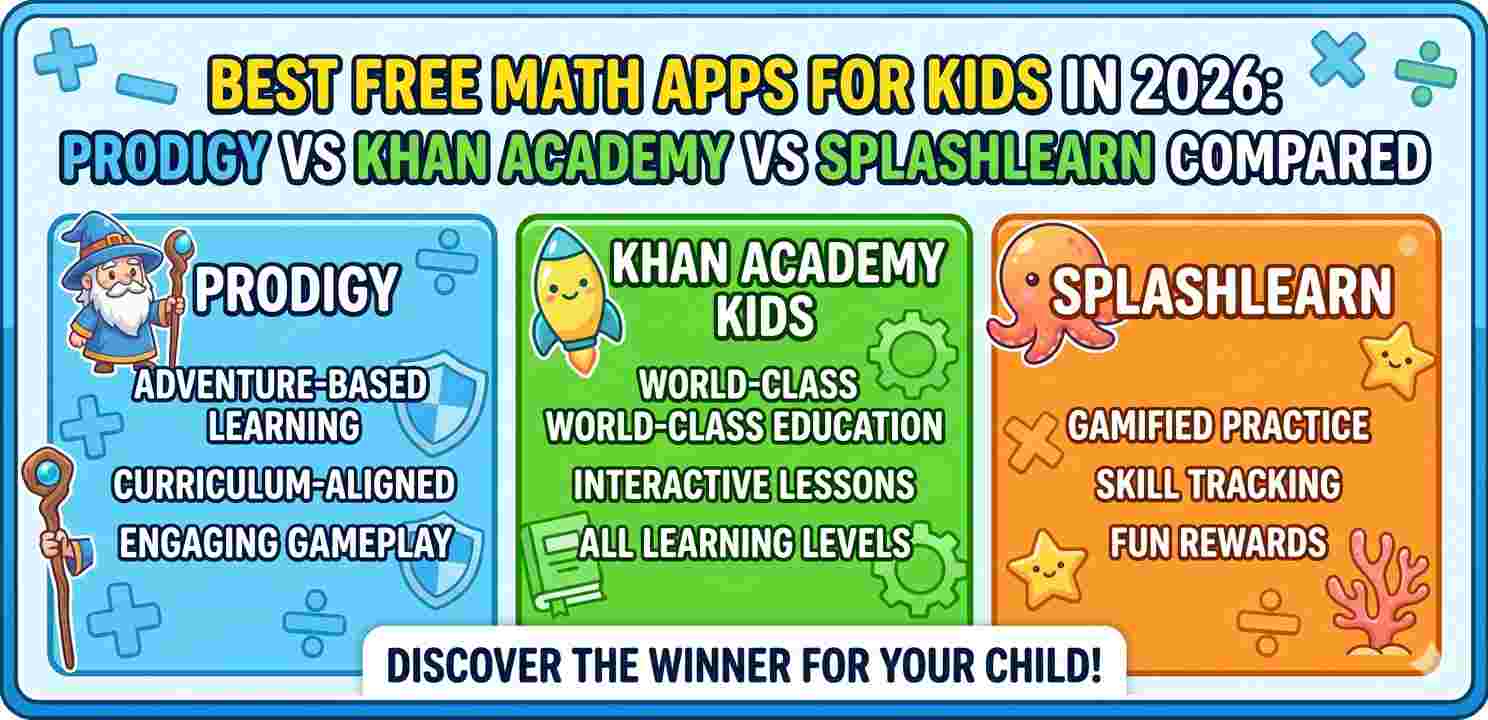
Finding the right free math apps for kids can genuinely feel overwhelming. There are dozens of options on the Play Store and App Store, each making big promises about “boosting grades” or “making math fun.” But once you actually sit down with a child and test them, you quickly realize most aren’t worth the screen time.
In 2026, three apps have consistently stood out from the crowd — Prodigy Math, Khan Academy Kids, and SplashLearn. Each one takes a slightly different approach. Each one has real strengths. And each one is, at its core, free to use.
This article breaks them down honestly, based on what they actually offer, who they’re best suited for, and where they fall short.
Why Free Math Apps for Kids Actually Matter
Not every family has the budget for tutors or paid educational subscriptions. Good free math apps for kids fill a real gap — especially for younger students who need regular practice outside of school.
Think about it this way: a child using a math app for 15 minutes after school, five days a week, gets over an hour of extra practice every week. That adds up fast. And if the app is engaging enough that the child actually wants to open it — even better.
The challenge, though, is knowing which apps deliver genuine learning and which just look educational on the surface.
What to Look for in Free Math Apps for Kids
Before comparing these three, it’s worth knowing what separates a useful math app from a forgettable one.
Grade alignment matters a lot. An app teaching kindergarten-level counting to a third grader is useless. The best free math apps for kids adapt to the child’s current level and push them forward gradually.
Engagement without distraction is another big one. Games and rewards are fine — but if the game mechanic overtakes the math, kids end up playing, not learning.
Progress visibility helps parents and teachers know whether the app is actually working. If you can’t see what a child has practiced or where they’re struggling, it’s hard to support them properly.
Prodigy Math: The RPG-Style Learning Game
Prodigy is one of the most downloaded free math apps for kids in North America, and it’s easy to see why. It wraps math practice inside a fantasy role-playing game. Kids create characters, go on adventures, battle monsters — and every battle requires answering a math question.
For kids between Grade 1 and Grade 8, this format works surprisingly well. The math questions themselves are pulled from school curriculum standards, so it’s not random practice — it’s structured.
The free version gives access to all math content. There’s a paid “membership” tier that unlocks more in-game rewards and features, but the math practice itself is fully available for free.
Where Prodigy Shines
Kids who resist traditional practice often respond well to Prodigy because the game gives them a reason to answer questions. It stops feeling like homework.
Parents and teachers can create free accounts, link to a child’s profile, and view basic reports on topics practiced. That visibility is genuinely useful — especially for a free math app for kids at this level.
Where It Falls Short
The game elements are so compelling that some kids focus more on leveling up their character than actually thinking through the math. Rushing through answers to get to the next battle is a real pattern. Also, the math questions can feel repetitive over time.
If a child has no interest in fantasy games, Prodigy won’t land the same way.
Khan Academy Kids: Structured and Curriculum-Aligned
Khan Academy has been a trusted name in free education for years, and their free math app for kids — Khan Academy Kids — lives up to that reputation for younger learners (ages 2–8).
Unlike Prodigy, Khan Academy Kids isn’t built around a game. It’s more of a structured learning environment with short video lessons, guided exercises, and stories. The tone is warm and encouraging without being over-the-top.
What Makes It Different
The app covers more than just math — reading, logic, and social skills are included too. But the math section is solid, covering foundational skills like number recognition, counting, addition, subtraction, and early multiplication in a way that genuinely builds understanding.
For parents who want something closer to how school actually teaches math, Khan Academy Kids feels more familiar. You can see learning paths clearly and track what a child has completed.
It’s completely free — no paid tier, no locked content. That’s unusual and worth highlighting. For families looking for free math apps for kids without any hidden costs, this is the cleanest option.
Limitations to Note
The app is primarily aimed at younger children. Once a child moves past early elementary level (roughly Grade 3 and up), they’ll outgrow it. Khan Academy’s main website and app handle older students, but Khan Academy Kids specifically is for the early years.
Also, the interface, while friendly, is less “exciting” than Prodigy. Some kids find it too calm and prefer something with more energy.
SplashLearn: Balancing Play and Practice
SplashLearn sits somewhere between Prodigy and Khan Academy Kids in terms of style. It covers Pre-K through Grade 5 and uses a playful, colorful interface with mini-games and animated characters to keep kids engaged.
The math content is strong — it aligns with common curriculum standards and covers everything from early number sense to fractions, geometry, and basic algebra concepts for older elementary students.
The Free Plan Reality
Here’s where it gets a bit complicated. SplashLearn does have a free version, but it’s more limited than Prodigy or Khan Academy Kids. The free plan offers a set number of practice problems per day, and some features are gated behind a paid subscription.
That said, the free tier is still genuinely useful, especially for short daily practice sessions. For many families, it’s enough. And for teachers, SplashLearn’s classroom tools — available free for educators — are particularly well-designed.
If you’re comparing free math apps for kids and budget is a firm constraint, just know that SplashLearn’s free experience is narrower than the others.
What SplashLearn Does Well
The interface is visually appealing and easy for young children to navigate independently. The difficulty adjusts based on performance, so a child isn’t stuck doing problems that are too easy or too hard.
There’s also a parent dashboard that shows detailed reports — topics covered, time spent, accuracy rates. For parents who want to stay closely involved in their child’s progress, this level of detail is helpful.
Side-by-Side Comparison
| Feature | Prodigy | Khan Academy Kids | SplashLearn |
|---|---|---|---|
| Age Range | Grades 1–8 | Ages 2–8 | Pre-K to Grade 5 |
| Fully Free | Math content yes | Yes, completely | Limited free tier |
| Game-Based | Strong RPG format | Light, warm tone | Mini-games |
| Progress Reports | Basic (free) | Yes | Detailed |
| Best For | Reluctant learners | Young beginners | Balanced practice |
Which App Should You Choose?
The honest answer is — it depends on the child.
If you have a kid who refuses to do math practice and needs motivation, Prodigy is probably your best starting point. The game hook works for a lot of children, and all the math content is genuinely free.
If your child is younger (under 7 or 8) and you want something structured that covers early foundations without any cost at all, Khan Academy Kids is the most complete free option. There are no hidden upgrades, and the content quality is high.
For families who want something visually polished with good progress tracking and don’t mind a slightly limited free plan, SplashLearn is worth exploring — especially for kids in the Pre-K to Grade 3 range.
Many parents end up using more than one. Prodigy for the evenings when a child wants to “play,” Khan Academy for focused practice sessions. That combination works well.
You can also explore Common Sense Media’s app reviews for independent ratings on these and similar apps. Another useful resource is Understood.org’s guide to learning apps, particularly if your child has a learning difference.
For more on building a healthy study routine around apps like these, check our guide on creating an effective after-school learning schedule for kids and how to reduce screen fatigue while still using educational apps.
A Quick Note for Teachers
All three apps have educator accounts or classroom modes. Khan Academy Kids and SplashLearn are particularly well-suited for classroom use because teachers can assign specific topics and see individual student performance.
Prodigy also has classroom tools, and many elementary teachers already use it as a supplement during free work periods. It saves setting up a new system from scratch.
Final Conclusion
In 2026, parents and educators genuinely don’t need to spend money to find quality free math apps for kids. Prodigy, Khan Academy Kids, and SplashLearn each bring something different to the table — and understanding those differences is what helps you pick the right one for a specific child.
Prodigy wins for engagement and upper-elementary coverage. Khan Academy Kids wins for young learners and zero-cost access. SplashLearn wins for visual polish and detailed progress tracking, even if the free tier is more limited.
None of them are perfect. All of them, used consistently, can make a real difference in how a child relates to math. That’s what matters most.
Start with one, give it two or three weeks, and see how your child responds. That hands-on test will tell you more than any comparison article ever could.